6. DAW-Specific Considerations
6.1 Bitwig Studio
- Mixed Plugin Formats: Bitwig can simultaneously load CLAP, VST3, and VST2 plugins. Mixing different plugin formats within a single project can cause synchronization issues between the stem busses and the master bus. When setting up THS, make sure to load the VST3 version of YSFX on your stem busses and within the plugin wrapper on your master bus track.
Setting Plugin Preferences in Bitwig
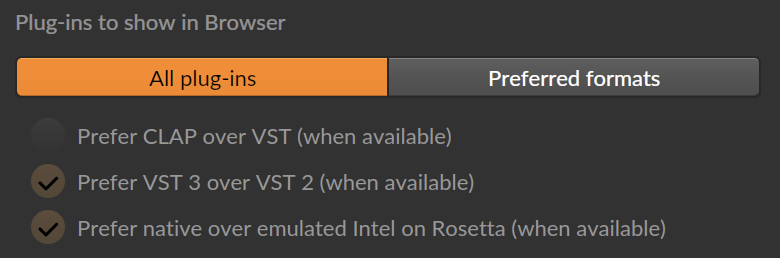
By default, Bitwig will apply its own priority scheme for the plugins displayed inside the DAW. This behavior can be modified and should be updated if you believe you have installed the CLAP and VST3 version of YSFX.
Open Bitwig's menu, then go to Settings. In the menu on the left-hand side, click Locations. Here, Bitwig offers several options for controlling how it prioritizes plugin versions. When testing Bitwig, I selected the All plug-ins option to force Bitwig to display all variants of all scanned plugins:
- Suspended Plugins: If you encounter issues with Bitwig suspending/sleeping any of the plugins needed to operate THS, you can set the Suspend setting to Never for the affected plugin in Bitwig's Inspector panel after selecting the plugin in the Device Panel. This will force the selected plugin to remain active at all times.
6.2 Universal Audio LUNA
- Sleeping Tracks: Due to the way LUNA manages its audio processing threads, any track that is not actively producing sound will likely be put to sleep. This may cause synchronization issues while using THS within LUNA.
Possible Synchronization Workaround for LUNA
Using LUNA's extension system, it may be possible to work around the sleep issue noted above. By applying the Studer A800 tape machine to all channels with Noise enabled, and applying the ATR-102 tape machine to all busses (including the main output) with Noise enabled, all tracks within the project will remain "silently" activated. Further testing is required.