3. JSFX Modifications
At the time this guide was published, TAM and TAMD require small modifications to their JSFX source for optimal performance when loaded via YSFX.
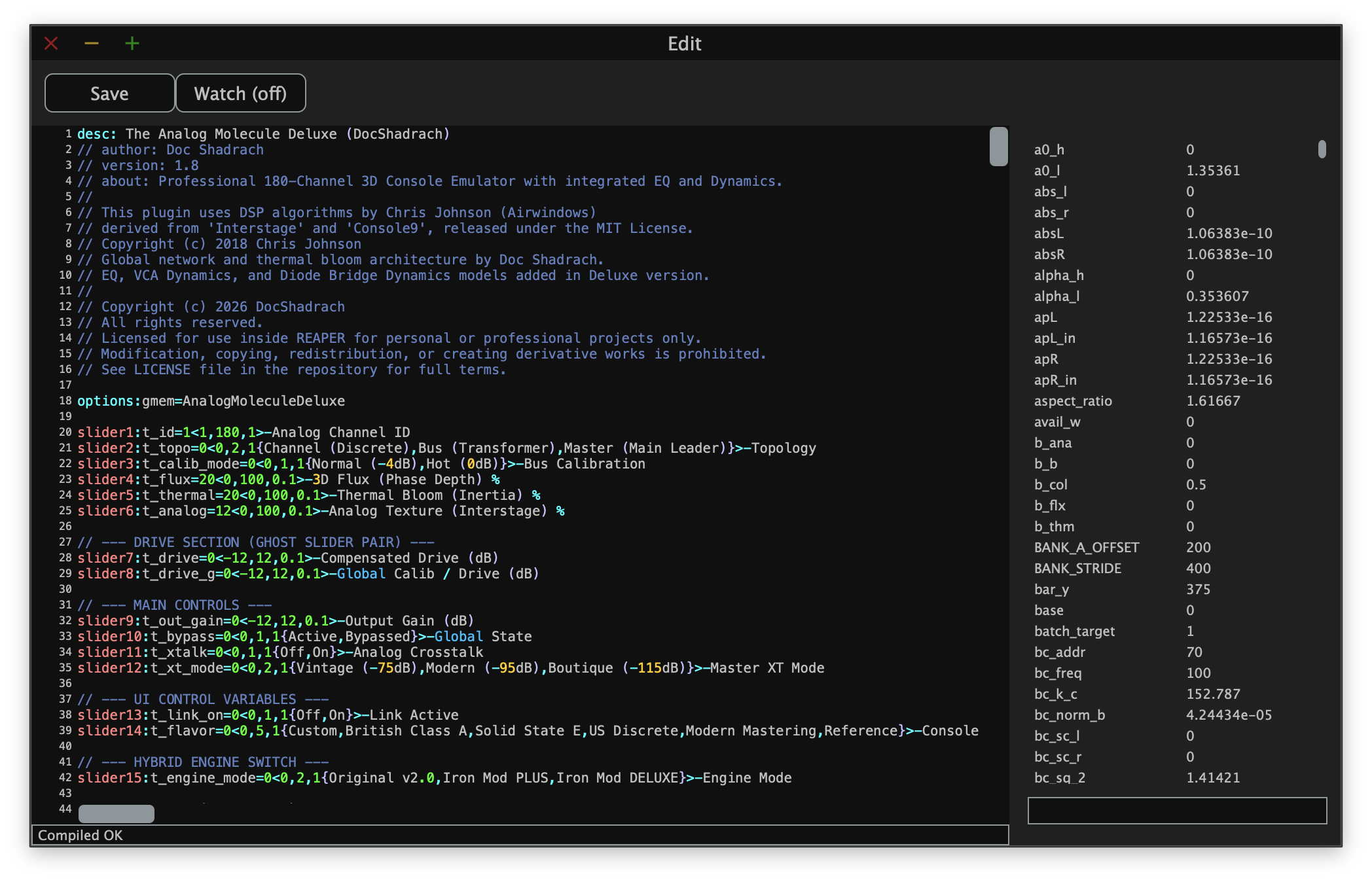
To make these changes, begin by loading a new instance of YSFX on any track. Then, load the JSFX file for TAM or TAMD. In the menu bar of YSFX, click Edit to open the built-in code editor. It should look similar to the following:
3.1 Hiding Sliders
By default, YSFX will display all the sliders defined for the plugin before drawing the plugin GUI. This can effectively "hide" the GUI of the plugin, making it difficult to use.
To hide the sliders, begin by locating the slider definitions near the top of the file. As an example, the following definition is for slider1:
slider1:t_id=1<1,180,1>Analog Channel ID
To hide this slider, you must add a single dash (-) before the label assigned to the slider. For slider1, the updated definition that hides the slider is as follows:
slider1:t_id=1<1,180,1>-Analog Channel ID
Repeat this process for all sliders with labels. When finished, click the Save button. This will update the JSFX file you loaded and will ensure that all future instances of TAM or TAMD will also hide the sliders by default.
Regular Expression for Selecting All Sliders
For users that are comfortable with Regular Expressions and have a text editor that can search for them, the following regex can be used to quickly select all sliders in the file:
(?:slider[0-9]{1,3}:[a-z,_,0-9,=]{1,20}.*>)
3.2 Channel ID Fix
TAM and versions of TAMD below v1.9 require a small modification to their JSFX source to prevent the Channel ID parameter from changing each time playback begins in your DAW. This is due to differences in the way YSFX stores and handles variable state compared to Reaper. Once you have updated to TAMD v1.9 or later, you will not need to apply this fix.
Go to the following lines depending on whether you are using the free TAM plugin or paid TAMD plugin:
- TAM: Line 422
- TAMD: Line 641
If you are in the correct location, the very next line of code should read @block. Beginning on the line specified above, add the following lines of code:
@serialize
file_var(0, s_init_done);
With the fix in place, your code should resemble the following:
// Code continues...
target_bypass = 1.0 - t_bypass;

@serialize
file_var(0, s_init_done);

@block
// Code continues...
When finished, click the Save button. This will update the JSFX file you loaded and will ensure that all future instances of TAM or TAMD will also apply this fix.